
End-to-End Film Collaboration Digital Workflow
From inspiration to wrap, Previs Shot delivers an elegantly digital production management experience for professional crews. Master every moment in the dance of light and shadow.
Redefine visual storytelling
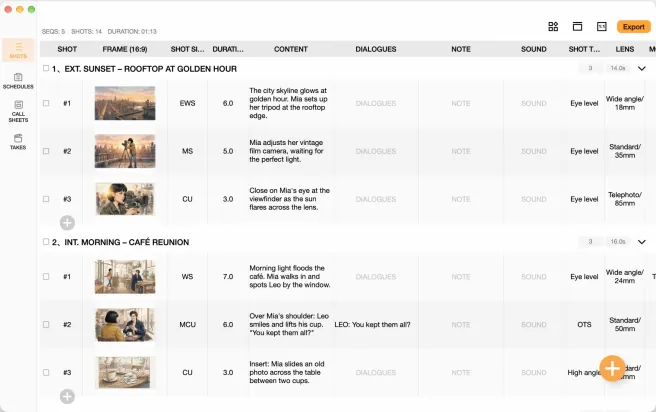
Supports mixed media, text-only, and professional storyboard modes for every creative stage. Built-in smart algorithms auto-adapt to film, series, and short-form aspect ratios — making every frame cinematic.
- Multi-mode switching
- Smart aspect ratio suggestions
- Cloud real-time sync
Storyboard mode: the whole film at a glance, with shot size, angle, movement and duration on every frame.
Display mode · Storyboard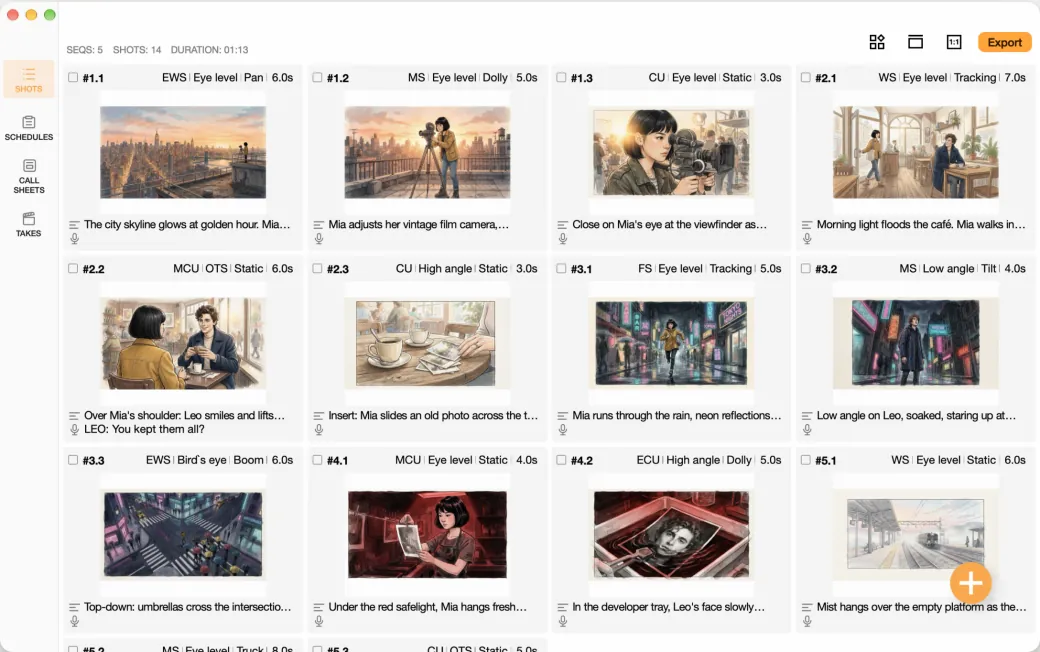
Master complex scheduling with one click
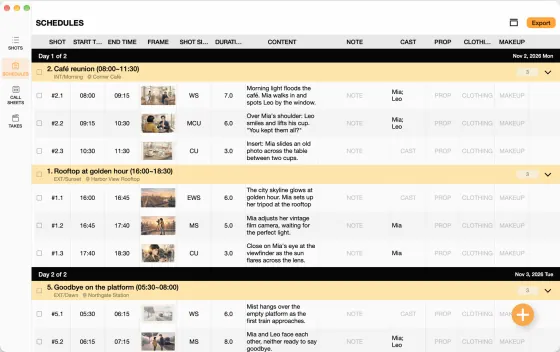
Reorganize shots into shooting sequences based on script scene logic. Smart daily scheduling syncs with cast — one storyboard dataset flows through the entire project, making every detail easy to manage.
- Unified Data
- 1:N
- End-to-End Linked
- LINKED
Break communication barriers
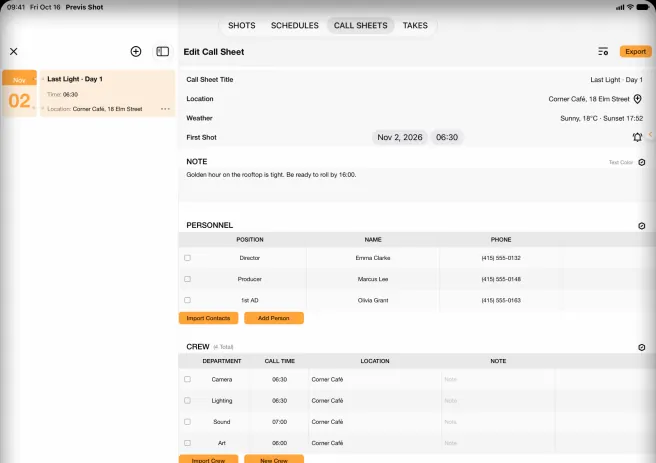
Auto-extract schedules, cast lists, crew roles, and locations from shooting plans to generate digital call sheets — no more tedious manual entry.
- Auto-linked Maps
- Multi-sync Updates
- Read Receipt Tracking
The on-set brain
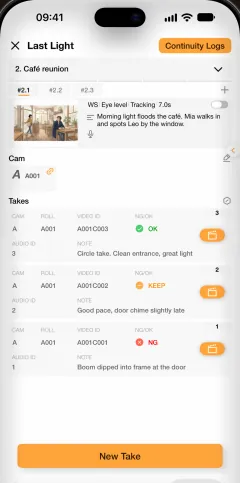
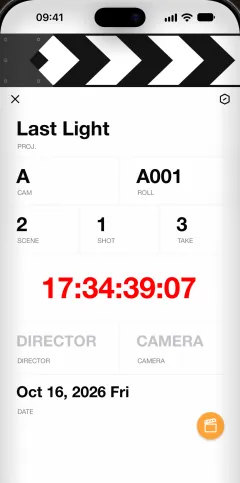
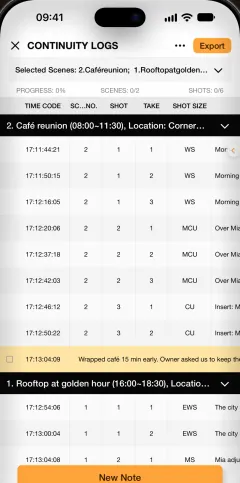
Built-in digital slate with multi-camera sync marking and ratings. Shooting progress updates in real-time, auto-generating daily logs with perfect metadata indexing for post-production.
Takes
Log every take as it happens
Slate
A slate in your pocket
Take sheet
Builds itself while you shoot
Dialogue in, takes out
The script comes straight from the dialogue in your shot list, split by shot and kept in sync. Run it across Mac, iPad, iPhone and an external display, then log the take in one tap.
Talent view: white on black, reading line in the upper third, lines already read fade back.
Stage mode · Take 3- Script
A script from your shots
Pull from dialogue, frame description, notes, sound or lighting, split by shot. Rewrites change the script, never the storyboard.
- Roles
Prompt one role at a time
Filter the script to a single character, so an actor sees their own lines instead of the whole scene.
- Scroll
Two ways to scroll
Steady scroll or one shot per page, with Bluetooth page turners, foot pedals and keyboard shortcuts.
- Voice
Voice tracking
On-device speech recognition follows the actor and pauses when they do. Turn it off and the mic is never requested.
- Multi-device
Every device on set
A Mac or iPad runs the show; an iPhone is the remote or the mirrored talent screen in the rig. On Mac, open the talent view in its own window or on an external display.
- Mirror
Mirrored for a beam splitter
Flip the text horizontally so it reads the right way round through the glass of a beam-splitter rig.
- Takes
Straight into your takes
Rate each camera NG, KEEP or OK when the take ends; line slips can go into the take notes.
- Standalone
Standalone scripts
Paste or import Word, PDF or Fountain with no project needed, and turn it into a shot list later.
No iPhone or iPad at hand? Use the web teleprompter
Paste your script and start reading: speed, section-by-section paging, mirroring and full screen are all there. Scripts stay in your browser — nothing is uploaded and there’s no sign-up.
Flexible Export
Export all content in multiple formats to seamlessly integrate into your existing workflow. Whether sharing with your team, archiving, or cross-platform collaboration — one click is all it takes.
 Previs Project File.previs
 Excel Spreadsheet.xlsx
 PDF Document.pdf
Ready to start your next creation?
iPad/iPhone Version
