
Every other tutorial in this series looks at one Previs Shot view at a time. This one doesn't — it follows a single scene from a real demo project through an entire shooting day, the same way the crew would actually experience it: planned the night before, scheduled onto a specific day, printed onto a call sheet, and then shot, take by take, until the day runs out. Four views, one continuous story.
1. The Night Before: Two Shots on Paper
SC 8 - Diner Meeting is small on purpose: two shots, one location, one morning. A wide shot establishes the booth where two leads are talking; a close-up lands on a folder of photographs sliding across the table between them — the kind of small prop beat that a whole scene can hinge on.
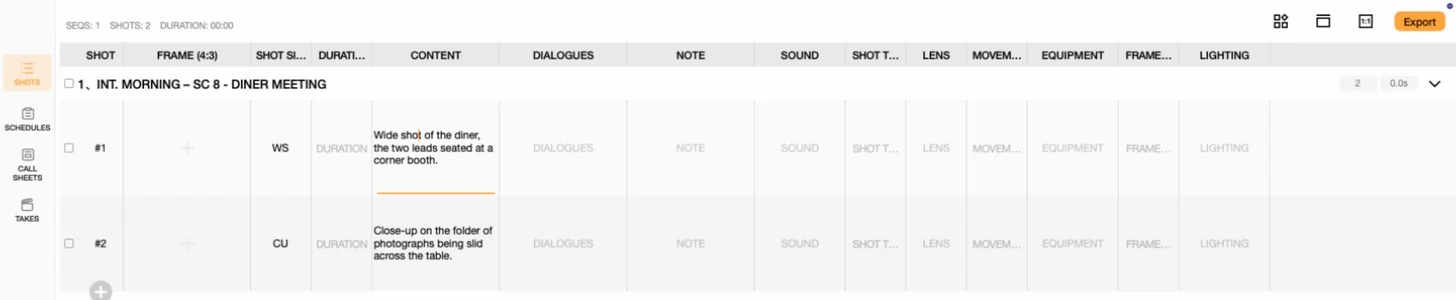
At this stage the scene exists only as an idea and a shot list — nothing is scheduled, nothing is staffed, and nothing has a call time yet.
2. Locking the Day
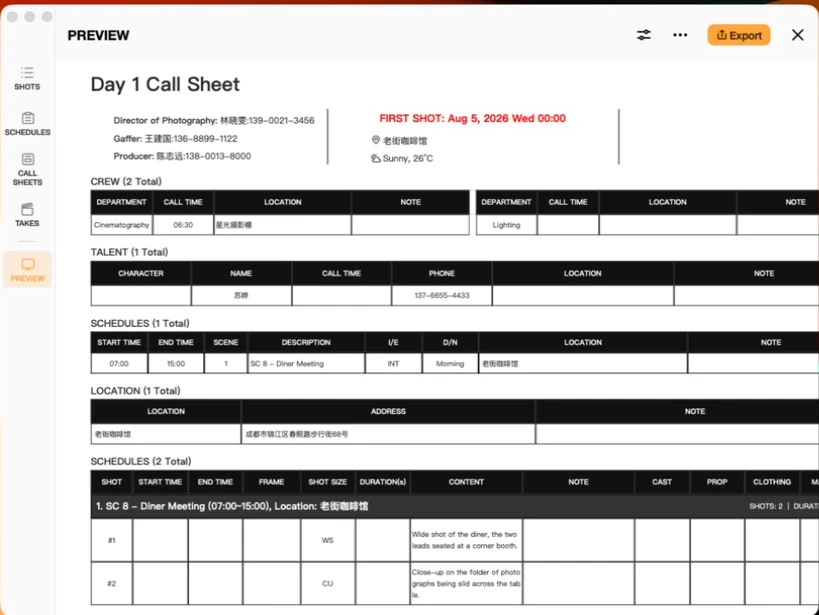
SC 8 gets placed on the calendar as Day 1: August 5, 2026, 07:00 to 15:00, entirely at one location. Both shots ride inside that single slot — this is the SCHEDULES view turning "we need to shoot this scene eventually" into "we are shooting this scene on this specific morning."

3. What Goes Out the Night Before
The schedule becomes a call sheet: Day 1 Call Sheet, sunny and 26°C, camera department called for 06:30 ahead of the 07:00 start, with the director of photography, gaffer and producer as personnel, the lead actress as talent, and the diner's address as the single location. Everyone on the crew gets the same document, built from the same schedule entry and the same directory contacts covered in Call Sheets Basics and Crew Directory Basics.
4. Rolling Camera: Shot #1
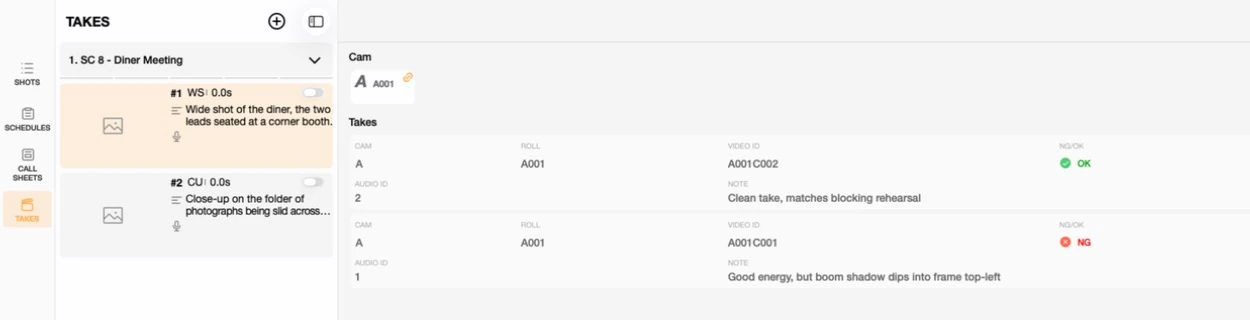
Morning of, shot #1 goes first. Take 1 (A001C001) has good energy but a boom shadow dips into the top-left of frame — an NG. Take 2 (A001C002) is clean and matches the blocking rehearsal — an OK, and the crew moves on.
5. The One That Got Away: Shot #2
Shot #2 doesn't go as cleanly. Take 1 (A001C003) is logged with a note — "Focus soft on the folder, redo" — and the day runs out before a second take gets recorded. Nobody's tapped NG, KEEP or OK on it yet; it just sits there, unscored, exactly as it was left.

This is the part a clean tutorial demo usually skips: not every scene wraps on schedule. Shot #2 becomes a pickup for the next available day, and the note is exactly what whoever shoots that pickup needs to read first.
6. One Day, Four Views
Nothing here required jumping between separate tools. The same scene moved through SHOTS, SCHEDULES, CALL SHEETS and TAKES as one continuous record of a single morning — a plan, a placement on the calendar, a document handed to the crew, and finally a log of what the camera actually caught. That's the shape of a real shooting day, and it's also the shape of a Previs Shot project once you've used more than one view in it.
This tutorial is part of the Previs Shot tutorial series. For each view on its own, see Shot List Basics, Shooting Plan Basics, Call Sheets Basics and Takes & Continuity Basics.