
If you're opening Previs Shot for the first time, the sidebar can look like four separate apps stapled together — SHOTS, SCHEDULES, CALL SHEETS, TAKES. It isn't. It's one production moving through four stages of the same day, and each view is just where that stage happens to live. This tutorial walks the whole path once, start to finish, with one real scene: plan it, schedule it, put it on a call sheet, then log what the camera actually caught.
1. One Shot Record, Four Views
Every shot in Previs Shot is a single record. It's born in SHOTS with a size, a piece of content, maybe a movement or a lens. That same shot then gets picked up by a schedule entry in SCHEDULES, gets printed onto a call sheet in CALL SHEETS, and finally gets a take logged against it in TAKES. Nothing is duplicated or re-entered by hand at each stage — the four views are four different questions asked of the same underlying shot: what is it, when is it, who needs to know, and what actually happened. That's also why the app is organized this way instead of as one long form: each question belongs to a different moment in production, from a writer's desk to a wrap slip.
2. Step 1 — Plan the Scene in SHOTS
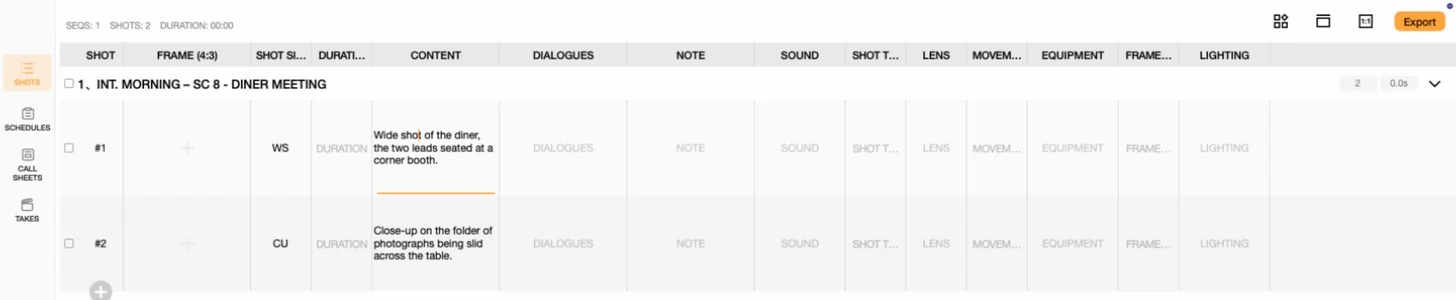
Everything starts here, before anyone is scheduled or called to set. SC 8 - Diner Meeting is two shots: a wide shot establishing two leads talking in a corner booth, and a close-up on a folder of photographs sliding across the table between them. At this stage the scene is pure planning — content, shot size, and whatever else the shot list needs — with no date, no crew and no call time attached yet.
3. Step 2 — Put It on the Calendar in SCHEDULES
A shot list on its own doesn't tell anyone when to show up. SCHEDULES is where SC 8 becomes Day 1: August 5, 2026, 07:00 to 15:00, at one location. Both shots ride inside that single window — this is the step that turns "we need to shoot this scene eventually" into a specific morning on the calendar.

4. Step 3 — Tell the Crew in CALL SHEETS
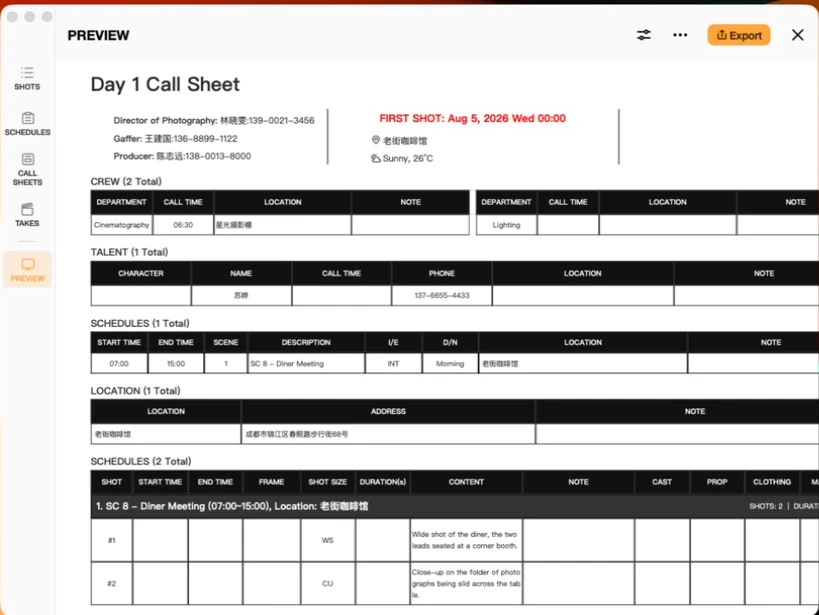
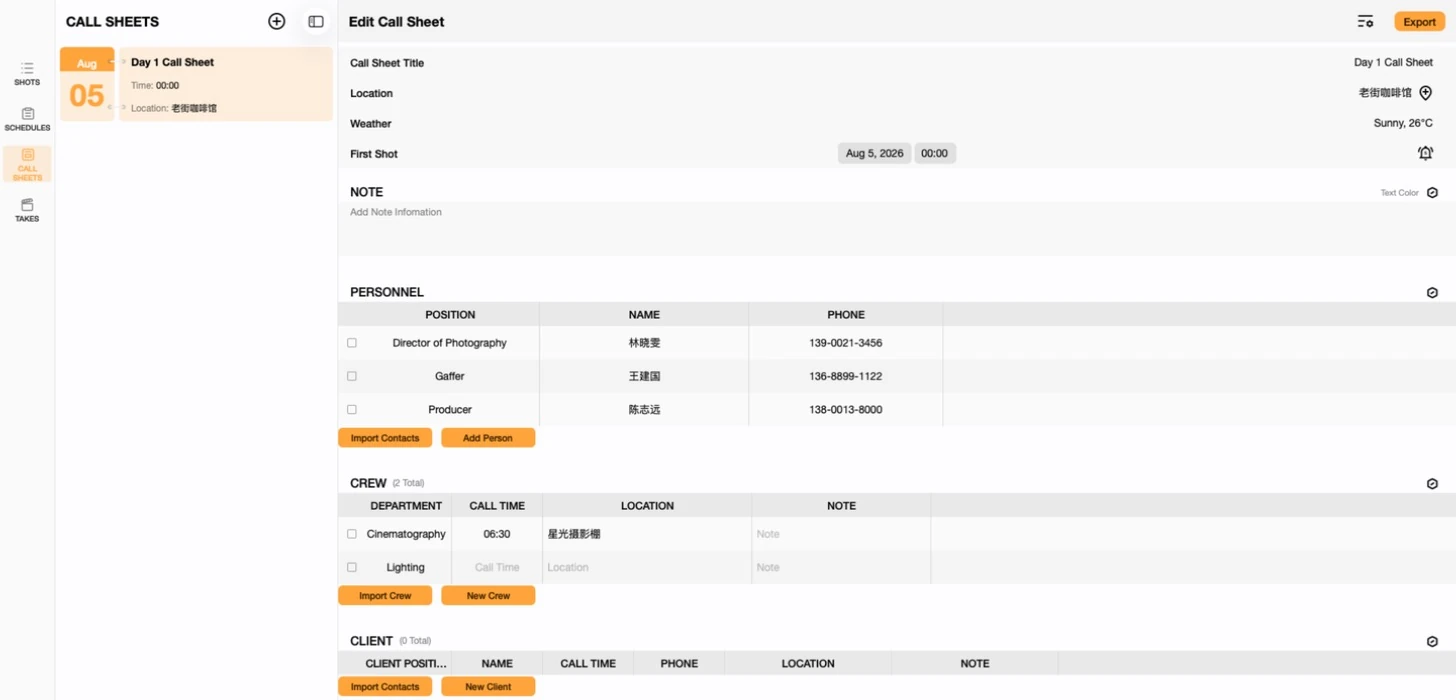
A schedule entry only means something to the people who can see the app. A call sheet is how that same information reaches everyone else: Day 1 Call Sheet pulls in the director of photography, gaffer and producer as personnel, the lead actress as talent, the diner as the single location, and the 07:00–15:00 slot straight from the schedule — plus a separate camera department call time of 06:30, ahead of the main call, for rigging.
5. Step 4 — Record What Happened in TAKES
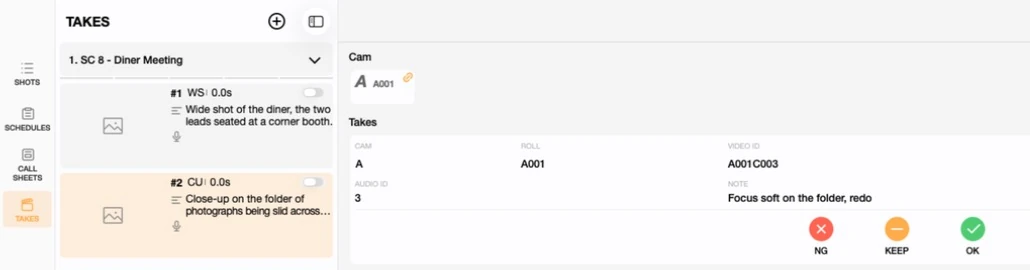
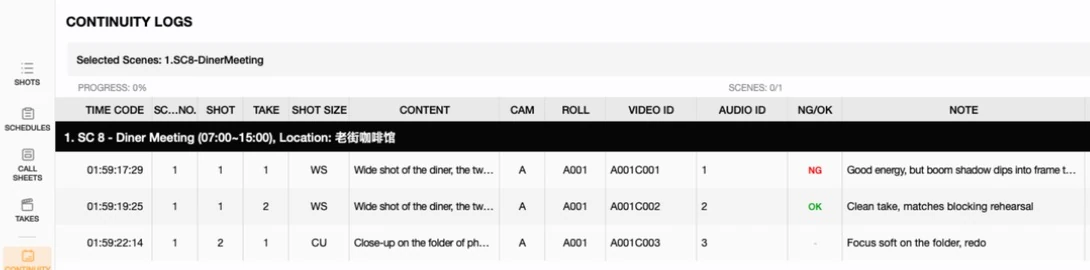
Everything before this point is a plan. TAKES is where the plan meets what the camera actually caught: each take gets logged against a shot, scored NG, KEEP or OK, and annotated with a note — and the Continuity Logs report rolls every take from the day into one timestamped table, the same record a script supervisor would keep by hand.
6. Why It's Worth Learning the Whole Path
- Fix data once, it's fixed everywhere. Because a call sheet imports from the same schedule entry and directory contacts a shot list already points to, correcting a phone number or a call time in one place keeps every document that references it accurate — see Call Sheets Basics on imported versus typed rows.
- Nothing skips a step on its own. A shot with no schedule entry can't appear on a call sheet, and a shot with no call sheet still gets its take logged normally in TAKES — the four views connect the same data, but none of them force you through the others before you're ready.
- The order above is the order that matters, not a rule. Some productions build every scene's shot list before scheduling anything; others schedule loosely and fill in shot lists scene by scene as shoot days approach. Either way, the same four views are what carries the work from a writer's idea to a wrap slip.
This tutorial is part of the Previs Shot tutorial series, and ties together four views covered on their own elsewhere: Shot List Basics, Shooting Plan Basics, Call Sheets Basics and Takes & Continuity Basics. For how a single scene actually plays out across an entire shooting day, including the shot that didn't get a clean take before time ran out, see A Day on Set.